Monday, May 19, 2014

Cool Times app - Release 1

I've released a new app in the Windows Store called Cool Times.  Look here for a complete description and to download it: Cool Times for Windows

I developed this app primarily as a real-world test of my ICE technology and to lay down a framework of standardized, reusable components that make it much faster and easier to develop new apps for Windows and Windows Phone.  But in this initial process, I think I've come up with something really useful and cool -- "Cool Times".  Here's a high-level view of some of the coolness:


Alarms
You can set up any number of alarms, which can alert you in various ways, including Daily, Weekdays, Weekends, Sunday through Saturday, One-time, and Any frequency.  You have total flexibility in setting up custom alarms exactly the way you need, and they remain active and accurate even if your machine is turned off!

Timers
Set up timers for fixed-duration events, such as cooking a dish, administering a timed exam in the classroom, etc.


Stop Watches
Stop watches are handy for timing races with laps, measuring events and event intervals, and anything else where you need to know how much time something takes.
Sharing
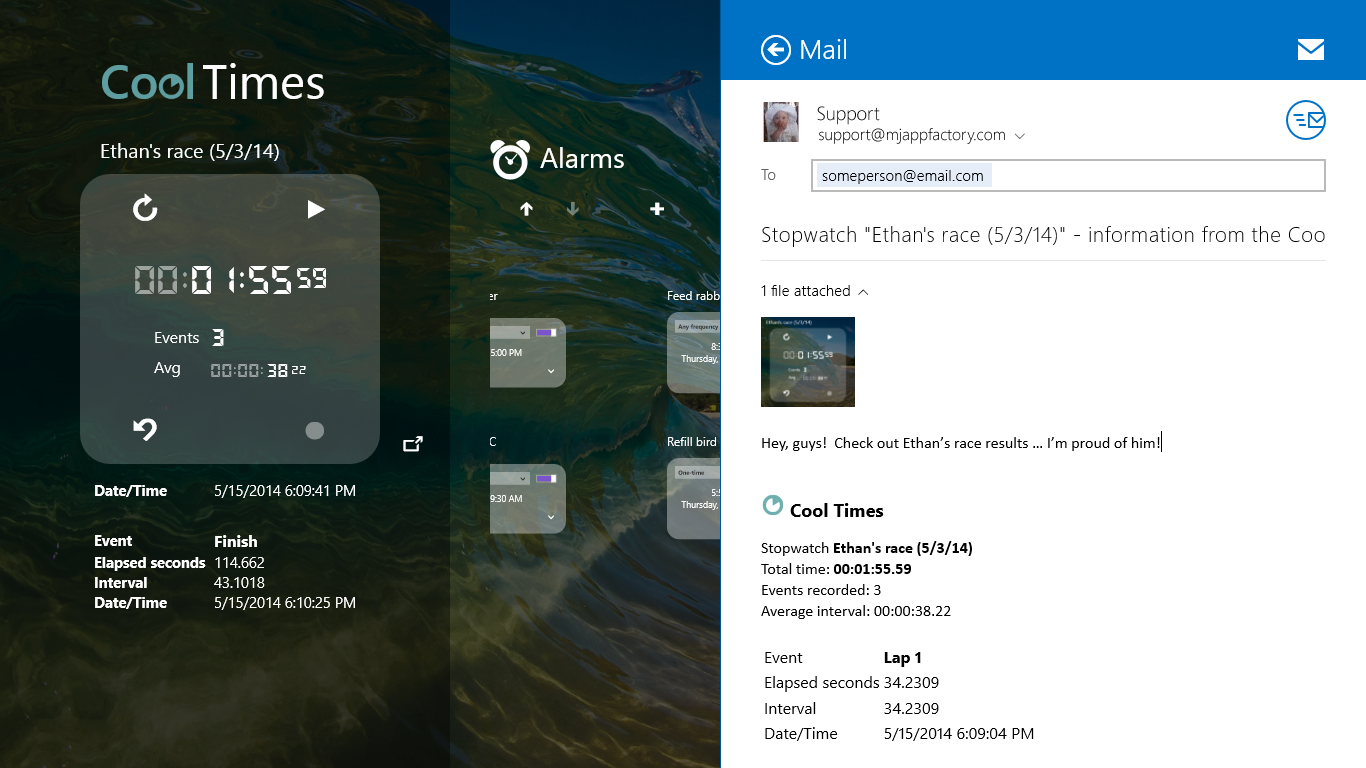
Share any of your time information with your friends and family, using the handy Share function.


Search
Use Search to quickly locate one of your alarms, timers, or stop watches when you have set up a lot of items and need to find one of them.

Customization
Customize the appearance of your app to whatever you like by selecting your own background image or highlight color.

Tuesday, August 27, 2013

Conversions enhancements and News

After spending time in Colorado for our sweet new granddaughter's birth, I've made more progress on the unit conversion functions in the Cool Conversions and Cool Grader apps, namely in adding new units:

  - Power: BTU per hour, BTU per minute, BTU per second, Foot-pound per minute,
     Foot-pound per second, Horsepower, Horsepower (electrical), Horsepower (metric),
     Kilowatt, Ton of refrigeration, Watt
  - Pressure: Atmosphere, Bar, Inch of mercury, Kilopascal, Millibar, Millimeter of mercury,
     Pascal, Pound per square inch, Technical atmosphere, Torr
  - Length/Distance: Angstrom, Hand, Link, Rod, Span
  - Speed: Light speed, Mach

Two new unit categories were added in these latest updates: Power and Pressure:


"Power" unit conversions
"Pressure" unit conversions

 
To see a complete list of all units currently supported, please visit the MJ App Factory website.
 
Also, I'm making progress on the Windows 8 (desktop/tablet) versions of Cool Conversions and Cool Grader.  More news on that later ...

Wednesday, July 24, 2013

Conversions enhancements

The Cool Grader and Cool Conversions apps have been enhanced to have a simpler user interface for the Conversions page and provide more detailed, useful measurement-unit information.  For one, the page has been changed to no longer display unit information at the bottom; it instead displays the detailed unit information on a separate page.  The new format for the main Conversions page is shown below:


Volume conversions
This new format has more room for displaying the unit lists and the conversion results, making the units easier to select and the results easier to read and more informative. 

To see the detailed unit information, the user may touch the (i) information button for either the From or the To unit, and the information is displayed on a separate page:


Detailed information for Liter
The user may scroll the page to see all the information available for the selected unit:


Remaining information for Liter
In addition, several web links are provided at the bottom for each unit, under the heading "More Information".  For example, touching the "Direct" web-link for the Liter unit displays the following page:


Direct web-link info for Liter
These enhancements to the Conversions page provide more detailed and easier-to-read information for each measurement unit, and a side-effect of the underlying code enhancements is that the page displays and scrolls more quickly and smoothly, especially when using a low-memory phone.

The new app versions containing these enhancements are Cool Grader 2.3.0 and Cool Conversions 1.3.0, which should be publicly available within a few days.  If you wish to view the detailed information for either of these apps in the Windows Phone Store, visit the following links:

Friday, July 5, 2013

Upcoming Conversions app enhancements

I'm about to port the Windows Phone apps (Cool Grader & Cool Conversions) to the Windows 8 / Tablet platform.  In preparation for that process, I've made some underlying code architecture improvements.  More visibly, I'm adding some additional units to the Conversions page (in Energy/Heat, Angles, and Pressure), and I've also enhanced each unit category to display detailed web information for each unit, as shown here:

Detailed unit information is
displayed from the web.
The information button ('i') is available
for both the 'From' and the 'To' units.


Wednesday, June 26, 2013

Cool Conversions™ and Cool Grader™ now available!


The new Cool Conversions (version 1.1.0) and Cool Grader (version 2.1.0) apps are now available in the Windows Phone Store. 
For details, please visit the following links:

Friday, June 14, 2013

Cool Grader 2.1.0 now in beta test phase

Cool Grader now contains the code to support a trial version of the app, which allows people to download and use it for free before they buy it.  The trial version lacks a few important functions but provides some basics and allows the customer use the app before purchasing. 

This new version also contains the Conversions system, which performs conversions between various measurement units, such as Area, Heat, Length, Mass, Speed, Temperature, Time, and Volume:


Conversions now supported
Length/Distance conversions


Beta-testing for Cool Grader 2.1.0 should be complete by this weekend, and pending evaluation and addressing any outstanding issues, the new app upgrade should be publicly available next week.

Wednesday, June 5, 2013

Search now supported

Based on user requests, I have added a Search function to the Unit Converter, which allows you to search for a measurement unit or unit category, as shown in the following example:


Starting from any point in the Converter screen, you may touch the [Search] button to bring up the Search display:

 
You may then type some or all of a unit name or category, and the matching items will automatically display:


In the above example, "mp" was typed into the 'Search for' box, and the units or categories that contained "mp" were automatically listed.  When you see the listed unit you are searching for, touch that unit to automatically display it in the Converter:


In the above example, the search item "mile per hour" was selected, and the Converter automatically displayed the "Speed" category and the "Mile per hour" unit.

You may also use the Search function to select a unit category.  For example, touch the [Search] button and scroll to the category you want:


If you want to see Mass units in the Converter, touch the "Mass" item in the search list, and the Converter will display that category with the previously-selected units: